How to Register a PKR888 Account Safely
This guide explains the information an adult user may be asked to provide when creating a PKR888 account and the precautions to take before sharing a phone number, OTP or payment details. Screen labels can change between app versions.
Before creating an account
- Install the app only after checking the current APK download information.
- Confirm that you meet the platform age requirement and the rules that apply in your location.
- Use a phone number you control and can keep secure.
- Create a unique password that is not used for email, banking or social accounts.
- Read the current privacy, payment and withdrawal terms inside the app.
Typical registration steps
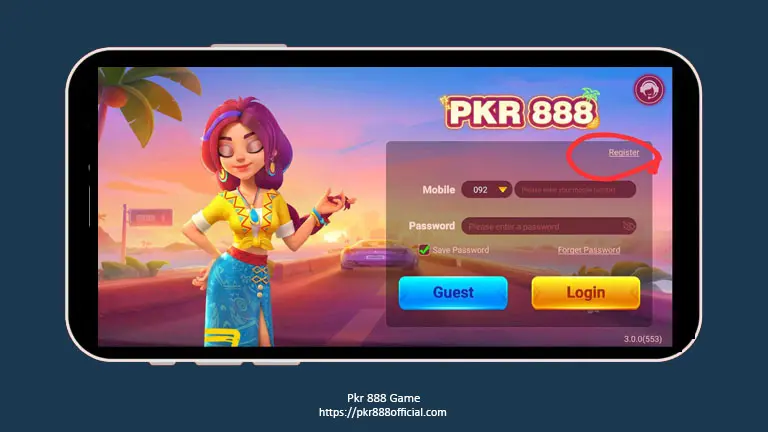
- Open the installed PKR888 app and choose Register or Sign Up.
- Enter the requested phone number and check the country code.
- Request the one-time verification code.
- Enter the OTP only inside the app screen you opened yourself.
- Create a strong password and record it in a trusted password manager.
- Review any referral or invitation field before submitting it; do not assume it is required.
- Read the account terms, then submit only if the details are correct.
Protect your OTP and password
An OTP can be used to confirm access to an account. Do not forward it through WhatsApp, SMS, email or live chat. A genuine support agent should not need your password, payment PIN or full verification code.
- Do not use your phone number, name or date of birth as the password.
- Do not save credentials on a shared phone.
- Lock the device with a PIN or biometric method.
- Ignore messages creating urgency around a bonus, blocked withdrawal or account upgrade.
Identity and payment information
The app operator may request identity or payment details, particularly before a withdrawal. Before submitting documents, confirm why they are needed, how they will be stored and whether the request appears inside the app’s normal account flow. This website does not collect documents for PKR888 and cannot verify an account on a user’s behalf.
Where required by the operator, the name on a payment account may need to match the registered identity. Check this before depositing; do not use another person’s account to bypass a verification rule.
If the OTP does not arrive
- Check the country code and phone number.
- Wait before requesting another code; repeated requests may temporarily block delivery.
- Confirm mobile signal and SMS availability.
- Check whether the phone filters unknown senders or service messages.
- Use only a support channel published inside the app or on a source you have independently verified.
Watch for fake support accounts
Fraudulent contacts may copy an app logo and claim they can unlock an account or accelerate a withdrawal. Treat an unsolicited WhatsApp or Telegram message as unverified. Never install a remote-access app, share the screen during payment or send money to “verify” a withdrawal.
Before depositing money
- Read the minimum deposit and withdrawal amounts.
- Check fees, account-verification requirements and processing times.
- Read every bonus condition, including wagering or turnover requirements.
- Start only with an amount you can afford to lose.
- Keep transaction receipts and account screenshots.
Registration does not guarantee a bonus, winning result or successful withdrawal. See our Responsible Gaming page before using any real-money feature.
Registration FAQ
Does PKR888Official create accounts?
No. This site cannot create, access, verify or recover a PKR888 account.
Should I share my OTP with support?
No. Enter an OTP only in the account screen you opened yourself. Do not send it to another person.
Is a referral code required?
Requirements can change. Do not assume an invitation field is mandatory unless the current app clearly says so.
Independent account-safety information for adults. We do not operate PKR888 or handle user credentials. Read our Privacy Policy and Disclaimer.